
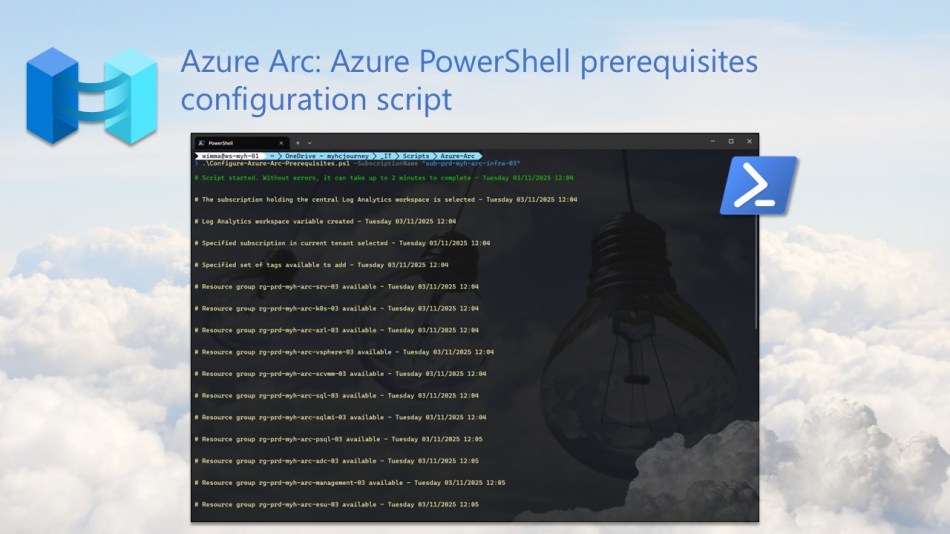
Want to streamline the onboarding of non-Azure resources into Azure? In this blog post, I walk you through how to configure Azure Arc prerequisites using an Azure PowerShell script.
Azure Arc enables you to bring on-premises, multi-cloud, and edge resources into Azure, providing a centralized management platform. This simplifies security, governance, and compliance across your entire hybrid environment, all from a single pane of glass.
💡 If you want to learn more about Azure Arc, check out the official Microsoft Docs here: Azure Arc documentation
To automate the configuration of most Azure Arc prerequisites, I wrote the below Azure PowerShell script, which performs various tasks and will be regularly adjusted as new Azure Arc features become available.
- Suppress Azure PowerShell breaking change warning messages to avoid unnecessary output.
- Change the current context to use the management subscription holding the central Log Analytics workspace
- Retrieve the Log Analytics workspace from the management subscription.
- Change the current context to the specified subscription.
- Store a specified set of tags in a hash table.
- Store a specified set of tags in a hash table.
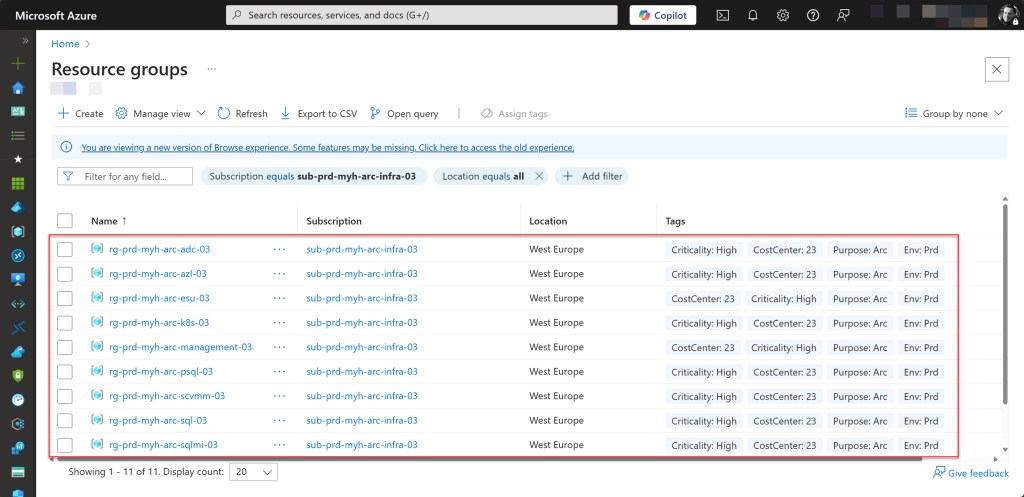
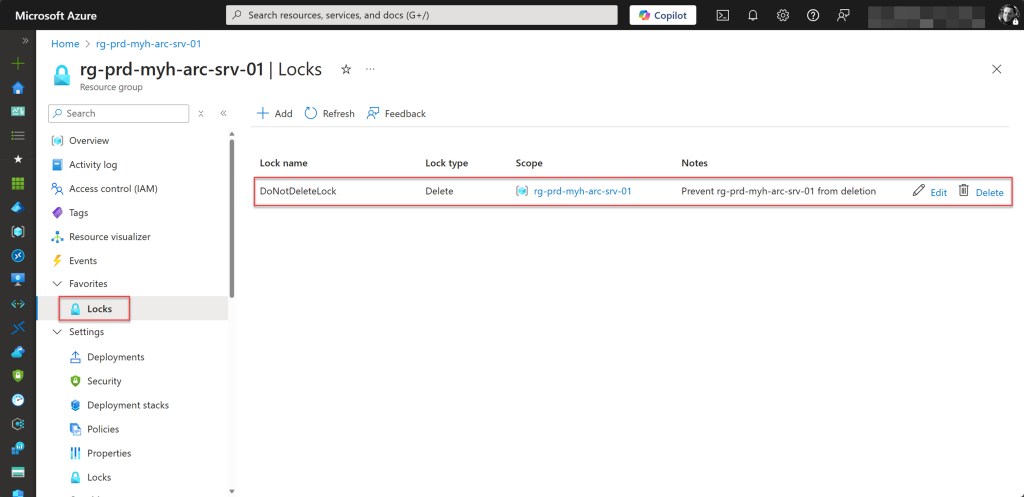
- Create a resource group for Azure Arc-enabled servers, if it not already exists. Add specified tags and a resource lock.
- Create a resource group for Azure Arc-enabled Kubernetes, if it not already exists. Add specified tags and a resource lock.
- Create a resource group for Azure Arc-based VM operations on your Azure Local, if it not already exists. Add specified tags and a resource lock.
- Create a resource group for Azure Arc-enabled VMware vSphere, if it not already exists. Add specified tags and a resource lock.
- Create a resource group for Azure Arc-enabled SCVMM, if it not already exists. Add specified tags and a resource lock.
- Create a resource group for SQL Server on Azure Arc-enabled servers, if it not already exists. Add specified tags and a resource lock.
- Create a resource group for SQL Managed Instance enabled by Azure Arc, if it not already exists. Add specified tags and a resource lock.
- Create a resource group for Azure Arc-enabled PostgreSQL (preview), if it not already exists. Add specified tags and a resource lock.
- Create a resource group for Management purposes, if it not already exists. Add specified tags and a resource lock.
- Create a resource group for Extended Security Updates, if it not already exists. Add specified tags and a resource lock.
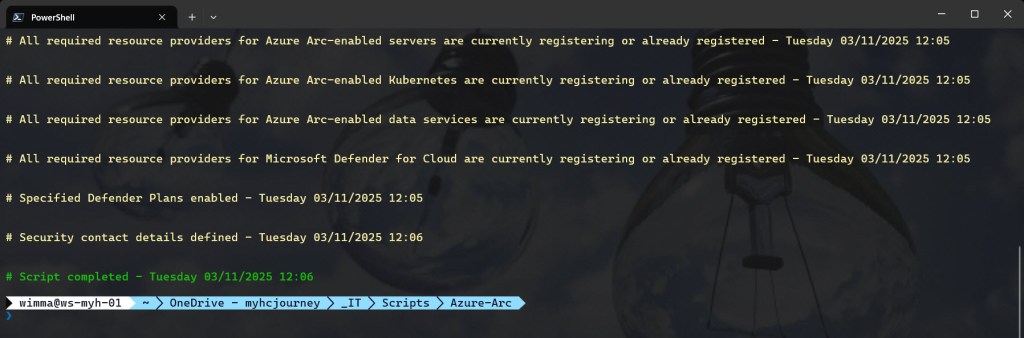
- Register required Azure resource providers for Azure Arc-enabled servers, if not already registered. Registration may take up to 10 minutes.
- Register required Azure resource providers for Azure Arc-enabled Kubernetes, if not already registered. Registration may take up to 10 minutes.
- Register required Azure resource providers for Azure Arc-enabled data services, if not already registered. Registration may take up to 10 minutes.
- Register required Azure resource providers for Microsoft Defender for Cloud, if not already registered. Registration may take up to 10 minutes.
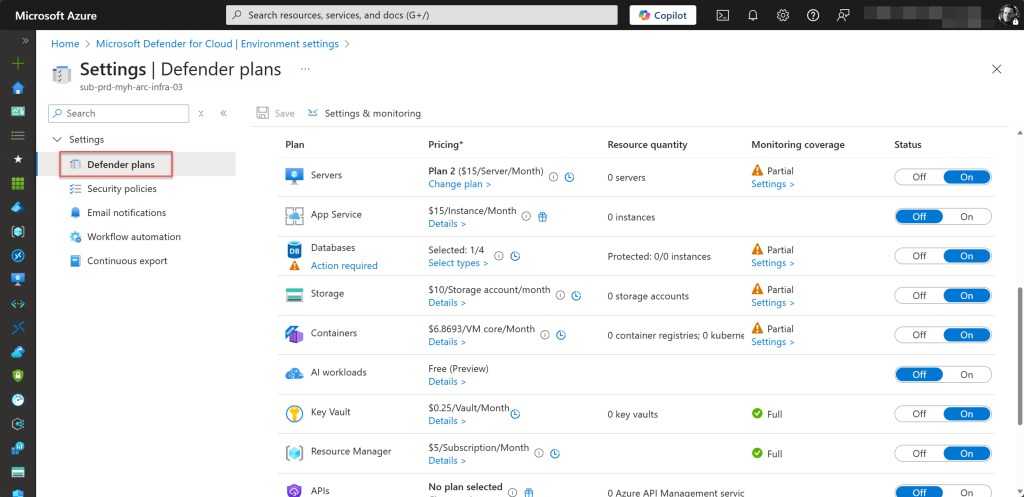
- Enable Defender Plans.
- Configure the Log Analytics workspace to which the agents will report.
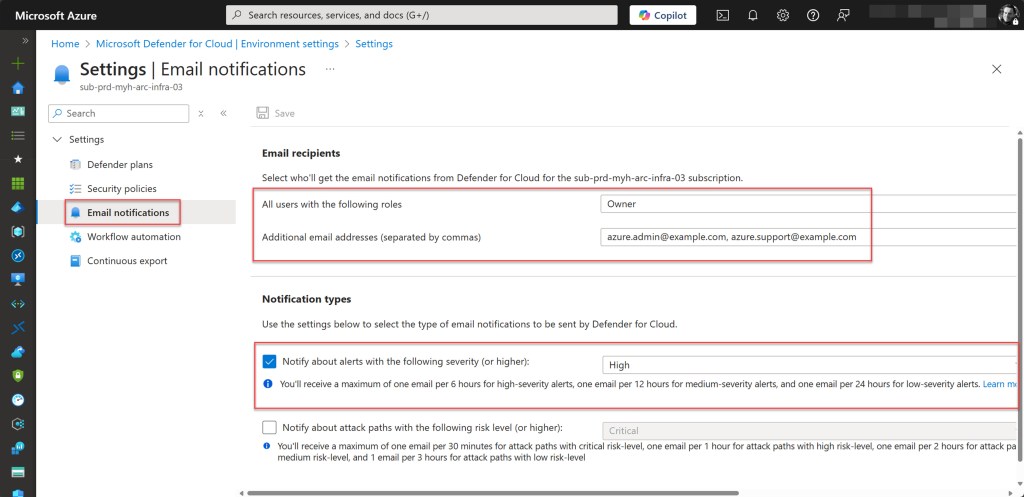
- Configure security contacts.
To use the script copy and save it as Configure-Azure-Arc-Prerequisites.ps1 or download it from GitHub.
Before running the script, adjust all “dynamic variables” to match your requirements.
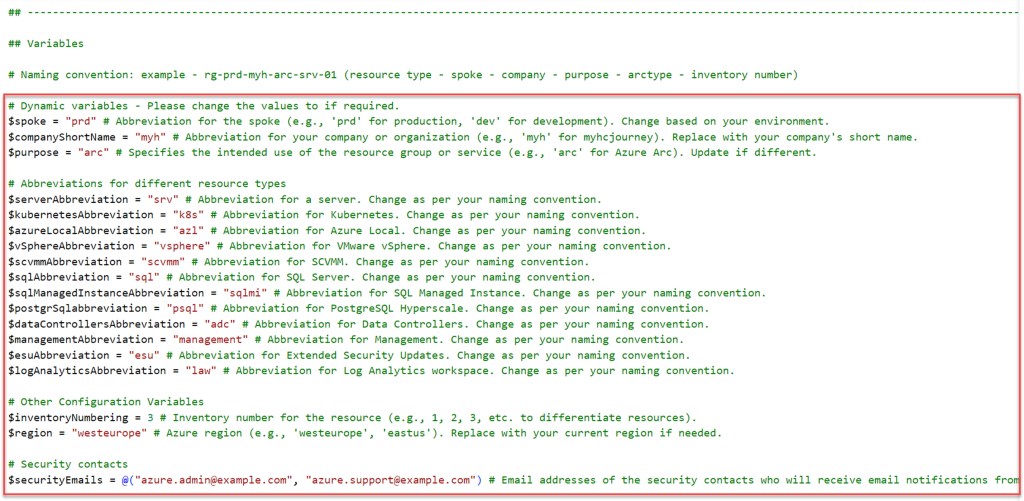
Then, execute the customized script via Windows Terminal, Visual Studio Code, or Windows PowerShell. Alternatively, you can run it directly from Cloud Shell.
Table of Contents
- Azure prerequisites
- Azure PowerShell script
- Validate registered resource providers for Azure Arc
- Conclusion
Azure prerequisites
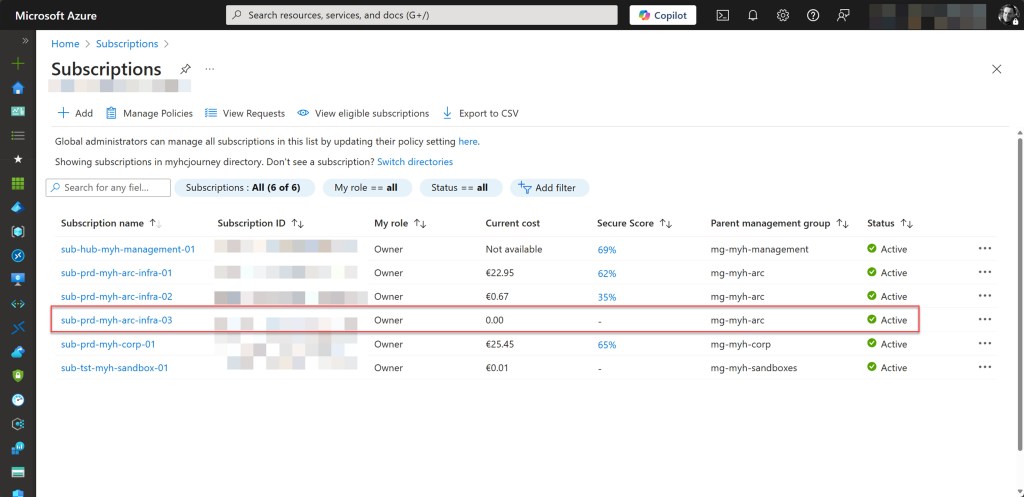
- An Azure subscription, preferably more than one if you plan to follow the Cloud Adoption Framework (CAF) enterprise-scale architecture. This includes a connectivity and/or management subscription, with at least one ARC subscription (landing zone) for deploying your Arc-related resources.
- An Azure Administrator account with the necessary RBAC roles.
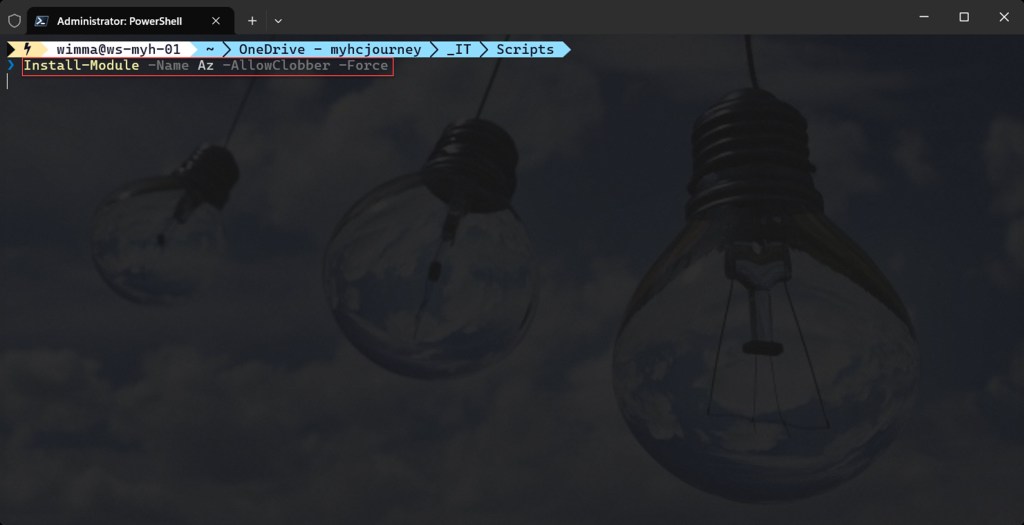
- At least Azure Az PowerShell module version 10.4.1
- After copying or downloading the script, ensure that all relevant (dynamic) variables are adjusted to match your Azure environment, as mentioned above.
- Install Azure PowerShell if used with Windows Terminal or Windows PowerShell.
Azure PowerShell script
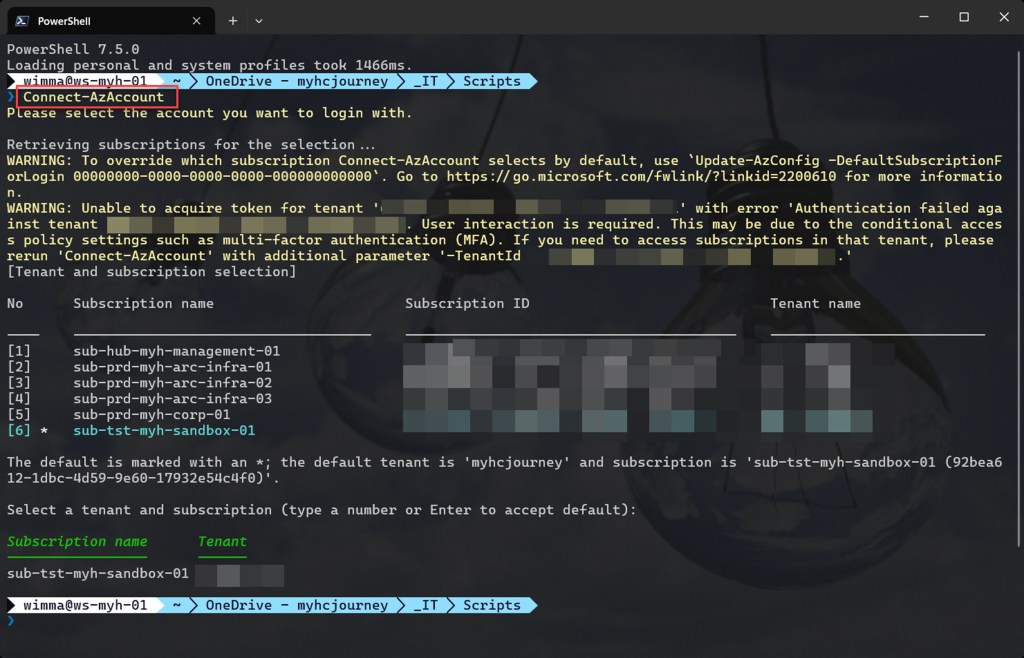
If you are not running the script from Cloud Shell, make sure to sign in using the Connect-AzAccount cmdlet to connect your Azure account.
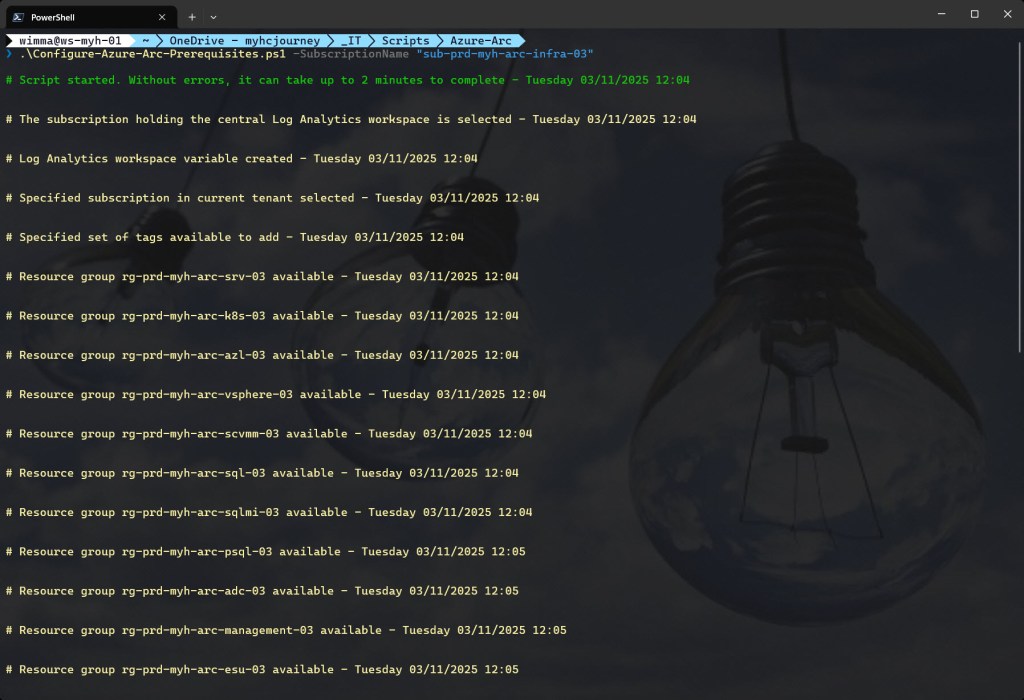
You can then run the script with the required parameters.
.\Configure-Azure-Arc-Prerequisites.ps1 -SubscriptionName <"your Azure subscription name here">
<#
.SYNOPSIS

A script used to configure prerequisites for Azure Arc.

.DESCRIPTION

A script used to configure prerequisites for Azure Arc.
This script will do all of the following:

Suppress Azure PowerShell breaking change warning messages to avoid unnecessary output.
Change the current context to use the management subscription holding the central Log Analytics workspace
Retrieve the Log Analytics workspace from the management subscription.
Change the current context to the specified subscription.
Store a specified set of tags in a hash table.
Create a resource group for Azure Arc-enabled servers, if it not already exists. Add specified tags and a resource lock.
Create a resource group for Azure Arc-enabled Kubernetes, if it not already exists. Add specified tags and a resource lock.
Create a resource group for Azure Arc-based VM operations on your Azure Local, if it not already exists. Add specified tags and a resource lock.
Create a resource group for Azure Arc-enabled VMware vSphere, if it not already exists. Add specified tags and a resource lock.
Create a resource group for Azure Arc-enabled SCVMM, if it not already exists. Add specified tags and a resource lock.
Create a resource group for SQL Server on Azure Arc-enabled servers, if it not already exists. Add specified tags and a resource lock.
Create a resource group for SQL Managed Instance enabled by Azure Arc, if it not already exists. Add specified tags and a resource lock.
Create a resource group for Azure Arc-enabled PostgreSQL (preview), if it not already exists. Add specified tags and a resource lock.
Create a resource group for Azure Arc data controller, if it not already exists. Add specified tags and a resource lock.
Create a resource group for Management purposes, if it not already exists. Add specified tags and a resource lock.
Create a resource group for Extended Security Updates, if it not already exists. Add specified tags and a resource lock.
Register required Azure resource providers for Azure Arc-enabled servers, if not already registered. Registration may take up to 10 minutes.
Register required Azure resource providers for Azure Arc-enabled Kubernetes, if not already registered. Registration may take up to 10 minutes.
Register required Azure resource providers for Azure Arc-enabled data services, if not already registered. Registration may take up to 10 minutes.
Register required Azure resource providers for Microsoft Defender for Cloud, if not already registered. Registration may take up to 10 minutes.
Enable Defender Plans.
Configure the Log Analytics workspace to which the agents will report.
Configure security contacts.

.NOTES

Filename:       Configure-Azure-Arc-Prerequisites.ps1
Created:        03/06/2022
Last modified:  10/03/2025
Author:         Wim Matthyssen
Version:        1.5
PowerShell:     Azure PowerShell and Azure Cloud Shell
Requires:       PowerShell Az (v10.4.1)
Action:         Change variables were needed to fit your needs.
Disclaimer:     This script is provided "As Is" with no warranties.

.EXAMPLE

Connect-AzAccount
Get-AzTenant (if not using the default tenant)
Set-AzContext -tenantID "xxxxxxxx-xxxx-xxxx-xxxxxxxxxxxx" (if not using the default tenant)
.\Configure-Azure-Arc-Prerequisites.ps1 -SubscriptionName <"your Azure subscription name here">

Example: .\Configure-Azure-Arc-Prerequisites.ps1 -SubscriptionName "sub-prd-myh-arc-infra-03"

.LINK

https://wmatthyssen.com/2022/06/03/azure-arc-azure-powershell-prerequisites-configuration-script/
#>

## ---------------------------------------------------------------------------------------------------------------------------------------------------------------------------------------------------

## Parameters

param(
    # $subscriptionName -> Name of the Azure Subscription
    [parameter(Mandatory =$true)][ValidateNotNullOrEmpty()] [string] $subscriptionName
)

## ---------------------------------------------------------------------------------------------------------------------------------------------------------------------------------------------------

## Variables

# Naming convention: example - rg-prd-myh-arc-srv-01 (resource type - spoke - company - purpose - arctype - inventory number)

# Dynamic variables - Please change the values to if required.
$spoke = "prd" # Abbreviation for the spoke (e.g., 'prd' for production, 'dev' for development). Change based on your environment.
$companyShortName = "myh" # Abbreviation for your company or organization (e.g., 'myh' for myhcjourney). Replace with your company's short name.
$purpose = "arc" # Specifies the intended use of the resource group or service (e.g., 'arc' for Azure Arc). Update if different.

# Abbreviations for different resource types
$serverAbbreviation = "srv" # Abbreviation for a server. Change as per your naming convention.
$kubernetesAbbreviation = "k8s" # Abbreviation for Kubernetes. Change as per your naming convention.
$azureLocalAbbreviation = "azl" # Abbreviation for Azure Local. Change as per your naming convention.
$vSphereAbbreviation = "vsphere" # Abbreviation for VMware vSphere. Change as per your naming convention.
$scvmmAbbreviation = "scvmm" # Abbreviation for SCVMM. Change as per your naming convention.
$sqlAbbreviation = "sql" # Abbreviation for SQL Server. Change as per your naming convention.
$sqlManagedInstanceAbbreviation = "sqlmi" # Abbreviation for SQL Managed Instance. Change as per your naming convention.
$postgrSqlabbreviation = "psql" # Abbreviation for PostgreSQL Hyperscale. Change as per your naming convention.
$dataControllersAbbreviation = "adc" # Abbreviation for Data Controllers. Change as per your naming convention.
$managementAbbreviation = "management" # Abbreviation for Management. Change as per your naming convention.
$esuAbbreviation = "esu" # Abbreviation for Extended Security Updates. Change as per your naming convention.
$logAnalyticsAbbreviation = "law" # Abbreviation for Log Analytics workspace. Change as per your naming convention.

# Other Configuration Variables
$inventoryNumbering = 3 # Inventory number for the resource (e.g., 1, 2, 3, etc. to differentiate resources).
$region = "westeurope" # Azure region (e.g., 'westeurope', 'eastus'). Replace with your current region if needed.

# Security contacts
$securityEmails = @("azure.admin@example.com", "azure.support@example.com") # Email addresses of the security contacts who will receive email notifications from Defender for Cloud.

# Resource groups Arc resources
$rgNameArcServers = "rg" + "-" + $spoke + "-" + $companyShortName + "-" + $purpose + "-" + $serverAbbreviation + "-" + $inventoryNumbering.ToString("D2")
$rgNameArcKubernetes = "rg" + "-" + $spoke + "-" + $companyShortName + "-" + $purpose + "-" + $kubernetesAbbreviation + "-" + $inventoryNumbering.ToString("D2")

# Resource groups Host environments
$rgNameArcAzureLocal = "rg" + "-" + $spoke + "-" + $companyShortName + "-" + $purpose + "-" + $azureLocalAbbreviation + "-" + $inventoryNumbering.ToString("D2")
$rgNameArcVSphere = "rg" + "-" + $spoke + "-" + $companyShortName + "-" + $purpose + "-" + $vSphereAbbreviation + "-" + $inventoryNumbering.ToString("D2")
$rgNameArcScvmm = "rg" + "-" + $spoke + "-" + $companyShortName + "-" + $purpose + "-" + $scvmmAbbreviation + "-" + $inventoryNumbering.ToString("D2")

# Resource groups Data services
$rgNameArcSqlServers = "rg" + "-" + $spoke + "-" + $companyShortName + "-" + $purpose + "-" + $sqlAbbreviation + "-" + $inventoryNumbering.ToString("D2")
$rgNameArcSqlManagedInstance = "rg" + "-" + $spoke + "-" + $companyShortName + "-" + $purpose + "-" + $sqlManagedInstanceAbbreviation + "-" + $inventoryNumbering.ToString("D2")
$rgNameArcPostgreSql = "rg" + "-" + $spoke + "-" + $companyShortName + "-" + $purpose + "-" + $postgrSqlabbreviation + "-" + $inventoryNumbering.ToString("D2")
$rgNameArcDataControllers = "rg" + "-" + $spoke + "-" + $companyShortName + "-" + $purpose + "-" + $dataControllersAbbreviation + "-" + $inventoryNumbering.ToString("D2")

# Resource groups other resources
$rgNameManagement = "rg" + "-" + $spoke + "-" + $companyShortName + "-" + $purpose + "-" + $managementAbbreviation + "-" + $inventoryNumbering.ToString("D2")
$rgNameEsu = "rg" + "-" + $spoke + "-" + $companyShortName + "-" + $purpose + "-" + $esuAbbreviation + "-" + $inventoryNumbering.ToString("D2")

# Log Analytics workspace
$logAnalyticsWorkSpaceName = $logAnalyticsAbbreviation + "-" + "hub" + "-" + $companyShortName + "-" + "01"

# Tags
$tagSpokeName = "Env" # The environment tag name you want to use.
$tagSpokeValue = "$($spoke[0].ToString().ToUpper())$($spoke.SubString(1))"
$tagCostCenterName  = "CostCenter" # The costCenter tag name you want to use.
$tagCostCenterValue = "23" # The costCenter tag value you want to use.
$tagCriticalityName  = "Criticality" # The businessCriticality tag name you want to use.
$tagCriticalityValue = "High" # The businessCriticality tag value you want to use.
$tagPurposeName  = "Purpose" # The purpose tag name you want to use.
$tagPurposeValue = "$($purpose[0].ToString().ToUpper())$($purpose.SubString(1))"

# Other variables
Set-PSBreakpoint -Variable currenttime -Mode Read -Action {$global:currenttime = Get-Date -Format "dddd MM/dd/yyyy HH:mm"} | Out-Null
$foregroundColor1 = "Green"
$foregroundColor2 = "Yellow"
$foregroundColor3 = "Red"
$writeEmptyLine = "`n"
$writeSeperatorSpaces = " - "

## ---------------------------------------------------------------------------------------------------------------------------------------------------------------------------------------------------

## Suppress Azure PowerShell breaking change warning messages to avoid unnecessary output.

Set-Item -Path Env:\SuppressAzurePowerShellBreakingChangeWarnings -Value $true | Out-Null
Update-AzConfig -DisplayBreakingChangeWarning $false | Out-Null
$warningPreference = "SilentlyContinue"

## ---------------------------------------------------------------------------------------------------------------------------------------------------------------------------------------------------

## Write script started

Write-Host ($writeEmptyLine + "# Script started. Without errors, it can take up to 2 minutes to complete" + $writeSeperatorSpaces + $currentTime)`
-foregroundcolor $foregroundColor1 $writeEmptyLine

## ---------------------------------------------------------------------------------------------------------------------------------------------------------------------------------------------------

## Change the current context to use the management subscription holding the central Log Analytics workspace

# The subscription is identified based on its name containing "*management*". Change the name if needed.
$subNameManagement = Get-AzSubscription | Where-Object {$_.Name -like "*management*"}

Set-AzContext -SubscriptionId $subNameManagement.SubscriptionId | Out-Null

Write-Host ($writeEmptyLine + "# The subscription holding the central Log Analytics workspace is selected" + $writeSeperatorSpaces + $currentTime)`
-foregroundcolor $foregroundColor2 $writeEmptyLine

## ---------------------------------------------------------------------------------------------------------------------------------------------------------------------------------------------------

## Retrieve the Log Analytics workspace from the management subscription

$workSpace = Get-AzOperationalInsightsWorkspace | Where-Object Name -Match $logAnalyticsWorkSpaceName

Write-Host ($writeEmptyLine + "# Log Analytics workspace variable created" + $writeSeperatorSpaces + $currentTime)`
-foregroundcolor $foregroundColor2 $writeEmptyLine

## ---------------------------------------------------------------------------------------------------------------------------------------------------------------------------------------------------

## Change the current context to the specified subscription

$subName = Get-AzSubscription | Where-Object {$_.Name -like $subscriptionName}

Set-AzContext -SubscriptionId $subName.SubscriptionId | Out-Null

Write-Host ($writeEmptyLine + "# Specified subscription in current tenant selected" + $writeSeperatorSpaces + $currentTime)`
-foregroundcolor $foregroundColor2 $writeEmptyLine

## ---------------------------------------------------------------------------------------------------------------------------------------------------------------------------------------------------

## Store the specified set of tags in a hash table

$tags = @{$tagSpokeName=$tagSpokeValue;$tagCostCenterName=$tagCostCenterValue;$tagCriticalityName=$tagCriticalityValue;$tagPurposeName=$tagPurposeValue}

Write-Host ($writeEmptyLine + "# Specified set of tags available to add" + $writeSeperatorSpaces + $currentTime)`
-foregroundcolor $foregroundColor2 $writeEmptyLine

## ---------------------------------------------------------------------------------------------------------------------------------------------------------------------------------------------------

## Create a resource group for Azure Arc-enabled servers, if it not already exists. Add specified tags and a resource lock

try {
    Get-AzResourceGroup -Name $rgNameArcServers -ErrorAction Stop | Out-Null
} catch {
    New-AzResourceGroup -Name $rgNameArcServers.ToLower() -Location $region -Force | Out-Null
}

# Set tags Azure Arc-enabled servers resource group
Set-AzResourceGroup -Name $rgNameArcServers -Tag $tags | Out-Null

# Lock the Azure Arc-enabled servers resource group with a CanNotDelete lock
$lock = Get-AzResourceLock -ResourceGroupName $rgNameArcServers

if ($null -eq $lock){
    New-AzResourceLock -LockName DoNotDeleteLock -LockLevel CanNotDelete -ResourceGroupName $rgNameArcServers -LockNotes "Prevent $rgNameArcServers from deletion" -Force | Out-Null
}

Write-Host ($writeEmptyLine + "# Resource group $rgNameArcServers available" + $writeSeperatorSpaces + $currentTime)`
-foregroundcolor $foregroundColor2 $writeEmptyLine

## ---------------------------------------------------------------------------------------------------------------------------------------------------------------------------------------------------

## Create a resource group for Azure Arc-enabled Kubernetes, if it not already exists. Add specified tags and a resource lock

try {
    Get-AzResourceGroup -Name $rgNameArcKubernetes -ErrorAction Stop | Out-Null
} catch {
    New-AzResourceGroup -Name $rgNameArcKubernetes.ToLower() -Location $region -Force | Out-Null
}

# Set tags Azure Arc-enabled Kubernetes resource group
Set-AzResourceGroup -Name $rgNameArcKubernetes -Tag $tags | Out-Null

# Lock the Azure Arc-enabled Kubernetes resource group with a CanNotDelete lock
$lock = Get-AzResourceLock -ResourceGroupName $rgNameArcKubernetes

if ($null -eq $lock){
    New-AzResourceLock -LockName DoNotDeleteLock -LockLevel CanNotDelete -ResourceGroupName $rgNameArcKubernetes -LockNotes "Prevent $rgNameArcKubernetes from deletion" -Force | Out-Null
}

Write-Host ($writeEmptyLine + "# Resource group $rgNameArcKubernetes available" + $writeSeperatorSpaces + $currentTime)`
-foregroundcolor $foregroundColor2 $writeEmptyLine

## ---------------------------------------------------------------------------------------------------------------------------------------------------------------------------------------------------

## Create a resource group for Azure Arc-based VM operations on your Azure Local, if it not already exists. Add specified tags and a resource lock

try {
    Get-AzResourceGroup -Name $rgNameArcAzureLocal -ErrorAction Stop | Out-Null
} catch {
    New-AzResourceGroup -Name $rgNameArcAzureLocal.ToLower() -Location $region -Force | Out-Null
}

# Set tags Azure Azure Arc-based VM operations on your Azure Local resource group
Set-AzResourceGroup -Name $rgNameArcAzureLocal -Tag $tags | Out-Null

# Lock the resource group for Azure Arc-based VM operations on your Azure Local with a CanNotDelete lock
$lock = Get-AzResourceLock -ResourceGroupName $rgNameArcAzureLocal

if ($null -eq $lock){
    New-AzResourceLock -LockName DoNotDeleteLock -LockLevel CanNotDelete -ResourceGroupName $rgNameArcAzureLocal -LockNotes "Prevent $rgNameArcAzureLocal from deletion" -Force | Out-Null
}

Write-Host ($writeEmptyLine + "# Resource group $rgNameArcAzureLocal available" + $writeSeperatorSpaces + $currentTime)`
-foregroundcolor $foregroundColor2 $writeEmptyLine

## ---------------------------------------------------------------------------------------------------------------------------------------------------------------------------------------------------

## Create a resource group for Azure Arc-enabled VMware vSphere, if it not already exists. Add specified tags and a resource lock

try {
    Get-AzResourceGroup -Name $rgNameArcVSphere -ErrorAction Stop | Out-Null
} catch {
    New-AzResourceGroup -Name $rgNameArcVSphere.ToLower() -Location $region -Force | Out-Null
}

# Set tags Azure Arc-enabled VMware vSphere resource group
Set-AzResourceGroup -Name $rgNameArcVSphere -Tag $tags | Out-Null

# Lock the Azure Azure Arc-enabled VMware vSphere resource group with a CanNotDelete lock
$lock = Get-AzResourceLock -ResourceGroupName $rgNameArcVSphere

if ($null -eq $lock){
    New-AzResourceLock -LockName DoNotDeleteLock -LockLevel CanNotDelete -ResourceGroupName $rgNameArcVSphere -LockNotes "Prevent $rgNameArcVSphere from deletion" -Force | Out-Null
}

Write-Host ($writeEmptyLine + "# Resource group $rgNameArcVSphere available" + $writeSeperatorSpaces + $currentTime)`
-foregroundcolor $foregroundColor2 $writeEmptyLine

## ---------------------------------------------------------------------------------------------------------------------------------------------------------------------------------------------------

## Create a resource group for Azure Arc-enabled SCVMM, if it not already exists. Add specified tags and a resource lock

try {
    Get-AzResourceGroup -Name $rgNameArcScvmm -ErrorAction Stop | Out-Null
} catch {
    New-AzResourceGroup -Name $rgNameArcScvmm.ToLower() -Location $region -Force | Out-Null
}

# Set tags Azure Arc-enabled SCVMM resource group
Set-AzResourceGroup -Name $rgNameArcScvmm -Tag $tags | Out-Null

# Lock the Azure Arc-enabled SCVMM resource group with a CanNotDelete lock
$lock = Get-AzResourceLock -ResourceGroupName $rgNameArcScvmm

if ($null -eq $lock){
    New-AzResourceLock -LockName DoNotDeleteLock -LockLevel CanNotDelete -ResourceGroupName $rgNameArcScvmm -LockNotes "Prevent $rgNameArcScvmm from deletion" -Force | Out-Null
}

Write-Host ($writeEmptyLine + "# Resource group $rgNameArcScvmm available" + $writeSeperatorSpaces + $currentTime)`
-foregroundcolor $foregroundColor2 $writeEmptyLine

## ---------------------------------------------------------------------------------------------------------------------------------------------------------------------------------------------------

## Create a resource group for SQL Server on Azure Arc-enabled servers, if it not already exists. Add specified tags and a resource lock

try {
    Get-AzResourceGroup -Name $rgNameArcSqlServers -ErrorAction Stop | Out-Null
} catch {
    New-AzResourceGroup -Name $rgNameArcSqlServers.ToLower() -Location $region -Force | Out-Null
}

# Set tags SQL Server on Azure Arc-enabled servers resource group
Set-AzResourceGroup -Name $rgNameArcSqlServers -Tag $tags | Out-Null

# Lock the SQL Server on Azure Arc-enabled servers resource group with a CanNotDelete lock
$lock = Get-AzResourceLock -ResourceGroupName $rgNameArcSqlServers

if ($null -eq $lock){
    New-AzResourceLock -LockName DoNotDeleteLock -LockLevel CanNotDelete -ResourceGroupName $rgNameArcSqlServers -LockNotes "Prevent $rgNameArcSqlServers from deletion" -Force | Out-Null
}

Write-Host ($writeEmptyLine + "# Resource group $rgNameArcSqlServers available" + $writeSeperatorSpaces + $currentTime)`
-foregroundcolor $foregroundColor2 $writeEmptyLine

## ---------------------------------------------------------------------------------------------------------------------------------------------------------------------------------------------------

## Create a resource group for SQL Managed Instance enabled by Azure Arc, if it not already exists. Add specified tags and a resource lock

try {
    Get-AzResourceGroup -Name $rgNameArcSqlManagedInstance -ErrorAction Stop | Out-Null
} catch {
    New-AzResourceGroup -Name $rgNameArcSqlManagedInstance.ToLower() -Location $region -Force | Out-Null
}

# Set tags SQL Managed Instance enabled by Azure Arc resource group
Set-AzResourceGroup -Name $rgNameArcSqlManagedInstance -Tag $tags | Out-Null

# Lock the SQL Managed Instance enabled by Azure Arc resource group with a CanNotDelete lock
$lock = Get-AzResourceLock -ResourceGroupName $rgNameArcSqlManagedInstance

if ($null -eq $lock){
    New-AzResourceLock -LockName DoNotDeleteLock -LockLevel CanNotDelete -ResourceGroupName $rgNameArcSqlManagedInstance -LockNotes "Prevent $rgNameArcSqlManagedInstance from deletion" -Force | Out-Null
}

Write-Host ($writeEmptyLine + "# Resource group $rgNameArcSqlManagedInstance available" + $writeSeperatorSpaces + $currentTime)`
-foregroundcolor $foregroundColor2 $writeEmptyLine

## ---------------------------------------------------------------------------------------------------------------------------------------------------------------------------------------------------

## Create a resource group for Azure Arc-enabled PostgreSQL (preview), if it not already exists. Add specified tags and a resource lock

try {
    Get-AzResourceGroup -Name $rgNameArcPostgreSql -ErrorAction Stop | Out-Null
} catch {
    New-AzResourceGroup -Name $rgNameArcPostgreSql.ToLower() -Location $region -Force | Out-Null
}

# Set tags Azure Arc-enabled PostgreSQL Hyperscale (preview) resource group
Set-AzResourceGroup -Name $rgNameArcPostgreSql -Tag $tags | Out-Null

# Lock the Azure Arc-enabled PostgreSQL Hyperscale (preview) resource group with a CanNotDelete lock
$lock = Get-AzResourceLock -ResourceGroupName $rgNameArcPostgreSql

if ($null -eq $lock){
    New-AzResourceLock -LockName DoNotDeleteLock -LockLevel CanNotDelete -ResourceGroupName $rgNameArcPostgreSql -LockNotes "Prevent $rgNameArcPostgreSql from deletion" -Force | Out-Null
}

Write-Host ($writeEmptyLine + "# Resource group $rgNameArcPostgreSql available" + $writeSeperatorSpaces + $currentTime)`
-foregroundcolor $foregroundColor2 $writeEmptyLine

## ---------------------------------------------------------------------------------------------------------------------------------------------------------------------------------------------------

## Create a resource group for Azure Arc data controller, if it not already exists. Add specified tags and a resource lock.

try {
    Get-AzResourceGroup -Name $rgNameArcDataControllers -ErrorAction Stop | Out-Null
} catch {
    New-AzResourceGroup -Name $rgNameArcDataControllers.ToLower() -Location $region -Force | Out-Null
}

# Set tags Azure Arc-enabled Data controllers resource group
Set-AzResourceGroup -Name $rgNameArcDataControllers -Tag $tags | Out-Null

# Lock the Azure Arc-enabled Data controllers resource group with a CanNotDelete lock
$lock = Get-AzResourceLock -ResourceGroupName $rgNameArcDataControllers

if ($null -eq $lock){
    New-AzResourceLock -LockName DoNotDeleteLock -LockLevel CanNotDelete -ResourceGroupName $rgNameArcDataControllers -LockNotes "Prevent $rgNameArcDataControllers from deletion" -Force | Out-Null
}

Write-Host ($writeEmptyLine + "# Resource group $rgNameArcDataControllers available" + $writeSeperatorSpaces + $currentTime)`
-foregroundcolor $foregroundColor2 $writeEmptyLine

## ---------------------------------------------------------------------------------------------------------------------------------------------------------------------------------------------------

## Create a resource group for Management purposes, if it not already exists. Add specified tags and a resource lock.

try {
    Get-AzResourceGroup -Name $rgNameManagement -ErrorAction Stop | Out-Null
} catch {
    New-AzResourceGroup -Name $rgNameManagement.ToLower() -Location $region -Force | Out-Null
}

# Set tags Management resource group
Set-AzResourceGroup -Name $rgNameManagement -Tag $tags | Out-Null

# Lock the Management resource group with a CanNotDelete lock
$lock = Get-AzResourceLock -ResourceGroupName $rgNameManagement

if ($null -eq $lock){
    New-AzResourceLock -LockName DoNotDeleteLock -LockLevel CanNotDelete -ResourceGroupName $rgNameManagement -LockNotes "Prevent $rgNameManagement from deletion" -Force | Out-Null
}

Write-Host ($writeEmptyLine + "# Resource group $rgNameManagement available" + $writeSeperatorSpaces + $currentTime)`
-foregroundcolor $foregroundColor2 $writeEmptyLine

## ---------------------------------------------------------------------------------------------------------------------------------------------------------------------------------------------------

## Create a resource group for Extended Security Updates, if it not already exists. Add specified tags and a resource lock.

try {
    Get-AzResourceGroup -Name $rgNameEsu -ErrorAction Stop | Out-Null
} catch {
    New-AzResourceGroup -Name $rgNameEsu.ToLower() -Location $region -Force | Out-Null
}

# Set tags Azure Extended Security Updates resource group
Set-AzResourceGroup -Name $rgNameEsu -Tag $tags | Out-Null

# Lock the Extended Security Updates resource group with a CanNotDelete lock
$lock = Get-AzResourceLock -ResourceGroupName $rgNameEsu

if ($null -eq $lock){
    New-AzResourceLock -LockName DoNotDeleteLock -LockLevel CanNotDelete -ResourceGroupName $rgNameEsu -LockNotes "Prevent $rgNameEsu from deletion" -Force | Out-Null
}

Write-Host ($writeEmptyLine + "# Resource group $rgNameEsu available" + $writeSeperatorSpaces + $currentTime)`
-foregroundcolor $foregroundColor2 $writeEmptyLine

## ---------------------------------------------------------------------------------------------------------------------------------------------------------------------------------------------------

## Register required Azure resource providers for Azure Arc-enabled servers, if not already registered. Registration may take up to 10 minutes

try {
    # Register Microsoft.HybridCompute resource provider
    Register-AzResourceProvider -ProviderNamespace Microsoft.HybridCompute  | Out-Null

    # Register Microsoft.HybridConnectivity resource provider
    Register-AzResourceProvider -ProviderNamespace Microsoft.HybridConnectivity  | Out-Null

    # Register Microsoft.GuestConfiguration resource provider
    Register-AzResourceProvider -ProviderNamespace Microsoft.GuestConfiguration  | Out-Null

    # Register Microsoft.Compute resource provider
    Register-AzResourceProvider -ProviderNamespace Microsoft.Compute  | Out-Null

    Write-Host ($writeEmptyLine + "# All required resource providers for Azure Arc-enabled servers are currently registering or already registered" + $writeSeperatorSpaces + $currentTime)`
    -foregroundcolor $foregroundColor2 $writeEmptyLine
} catch {
    Write-Host ($writeEmptyLine + "# Error registering resource providers for Azure Arc-enabled servers: $_" + $writeSeperatorSpaces + $currentTime)`
    -foregroundcolor $foregroundColor3 $writeEmptyLine
}

## ---------------------------------------------------------------------------------------------------------------------------------------------------------------------------------------------------

## Register required Azure resource providers for Azure Arc-enabled Kubernetes, if not already registered. Registration may take up to 10 minutes

try {
    # Register Microsoft.Kubernetes resource provider
    Register-AzResourceProvider -ProviderNamespace Microsoft.Kubernetes | Out-Null

    # Register Microsoft.KubernetesConfiguration resource provider
    Register-AzResourceProvider -ProviderNamespace Microsoft.KubernetesConfiguration | Out-Null

    # Register Microsoft.ExtendedLocation resource provider
    Register-AzResourceProvider -ProviderNamespace Microsoft.ExtendedLocation | Out-Null

    Write-Host ($writeEmptyLine + "# All required resource providers for Azure Arc-enabled Kubernetes are currently registering or already registered" + $writeSeperatorSpaces + $currentTime)`
    -foregroundcolor $foregroundColor2 $writeEmptyLine
} catch {
    Write-Host ($writeEmptyLine + "# Error registering resource providers for Azure Arc-enabled Kubernetes: $_" + $writeSeperatorSpaces + $currentTime )`
    -foregroundcolor $foregroundColor3 $writeEmptyLine
}

## ---------------------------------------------------------------------------------------------------------------------------------------------------------------------------------------------------

## Register required Azure resource providers for Azure Arc-enabled data services, if not already registered. Registration may take up to 10 minutes

try {
    # Register Microsoft.AzureArcData resource provider
    Register-AzResourceProvider -ProviderNamespace Microsoft.AzureArcData  | Out-Null

    Write-Host ($writeEmptyLine + "# All required resource providers for Azure Arc-enabled data services are currently registering or already registered" + $writeSeperatorSpaces + $currentTime)`
    -foregroundcolor $foregroundColor2 $writeEmptyLine
} catch {
    Write-Host ($writeEmptyLine + "# Error registering resource providers for Azure Arc-enabled data services: $_" + $writeSeperatorSpaces + $currentTime)`
    -foregroundcolor $foregroundColor3 $writeEmptyLine
}

## ---------------------------------------------------------------------------------------------------------------------------------------------------------------------------------------------------

## Register required Azure resource providers for Microsoft Defender for Cloud, if not already registered. Registration may take up to 10 minutes.

try {
    # Register Microsoft.Security resource provider
    Register-AzResourceProvider -ProviderNamespace Microsoft.Security | Out-Null

    # Register Microsoft.PolicyInsights resource provider
    Register-AzResourceProvider -ProviderNamespace Microsoft.PolicyInsights | Out-Null

    Write-Host ($writeEmptyLine + "# All required resource providers for Microsoft Defender for Cloud are currently registering or already registered" + $writeSeperatorSpaces + $currentTime)`
    -foregroundcolor $foregroundColor2 $writeEmptyLine
} catch {
    Write-Host ($writeEmptyLine + "# Error registering resource providers for Microsoft Defender for Cloud: $_" + $writeSeperatorSpaces + $currentTime)`
    -foregroundcolor $foregroundColor3 $writeEmptyLine
}

## ---------------------------------------------------------------------------------------------------------------------------------------------------------------------------------------------------

## Enable Defender Plans

# Defender for Servers Plan 2
Set-AzSecurityPricing -Name "VirtualMachines" -PricingTier "Standard" | Out-Null

# Defender for Containers
Set-AzSecurityPricing -Name "Containers" -PricingTier "Standard" | Out-Null

# Defender for Key Vault
Set-AzSecurityPricing -Name "KeyVaults" -PricingTier "Standard" | Out-Null

# Defender for SQL servers on machines
Set-AzSecurityPricing -Name "SqlServerVirtualMachines" -PricingTier "Standard" | Out-Null

# Defender for Storage
Set-AzSecurityPricing -Name "StorageAccounts" -PricingTier "Standard" | Out-Null

# Defender for Resource Manager
Set-AzSecurityPricing -Name "ARM" -PricingTier "Standard" | Out-Null

Write-Host ($writeEmptyLine + "# Specified Defender Plans enabled" + $writeSeperatorSpaces + $currentTime)`
-foregroundcolor $foregroundColor2 $writeEmptyLine

## ---------------------------------------------------------------------------------------------------------------------------------------------------------------------------------------------------

## Configure the Log Analytics workspace to which the agents will report

Set-AzSecurityWorkspaceSetting -Name "default" -Scope "/subscriptions/$($subName.Id)" -WorkspaceId $workSpace.ResourceId | Out-Null

## ---------------------------------------------------------------------------------------------------------------------------------------------------------------------------------------------------

## Configure security contacts

# Convert the array to a comma-separated string
$securityEmailsString = $securityEmails -join ';'

Set-AzSecurityContact -Name "default" -Email $securityEmailsString -AlertAdmin -NotifyOnAlert | Out-Null

Write-Host ($writeEmptyLine + "# Security contact details defined" + $writeSeperatorSpaces + $currentTime)`
-foregroundcolor $foregroundColor2 $writeEmptyLine

## ---------------------------------------------------------------------------------------------------------------------------------------------------------------------------------------------------

## Write script completed

Write-Host ($writeEmptyLine + "# Script completed" + $writeSeperatorSpaces + $currentTime)`
-foregroundcolor $foregroundColor1 $writeEmptyLine

## ---------------------------------------------------------------------------------------------------------------------------------------------------------------------------------------------------
Validate registered resource providers for Azure Arc
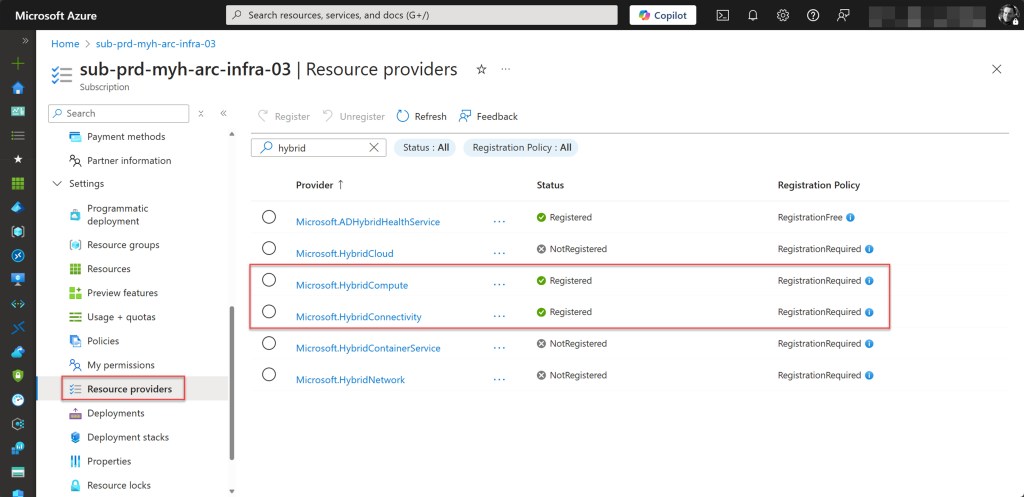
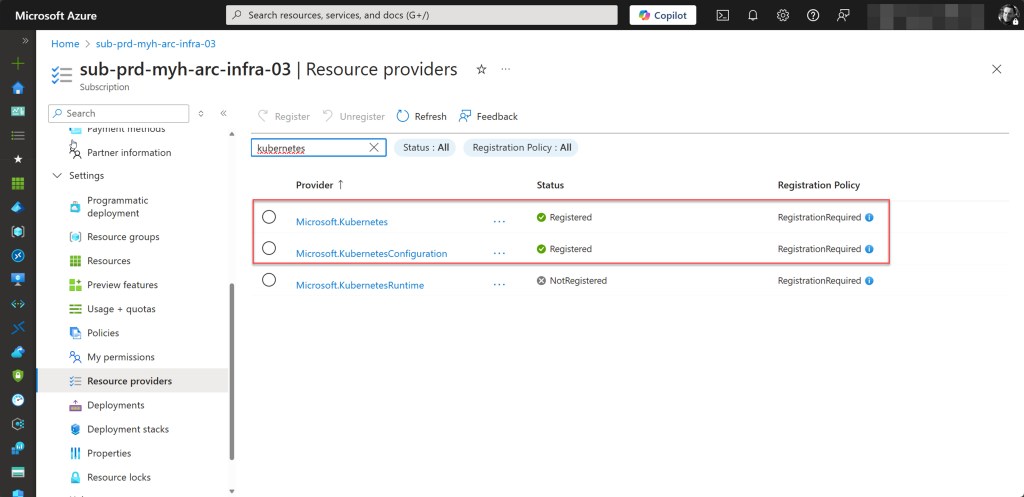
To check if all required Azure Arc resource providers are registered in your Azure subscription, you can verify them through the Azure Portal. Simply navigate to your Arc subscription using your preferred method, select Resource providers, and use the search bar to find and check each required provider.
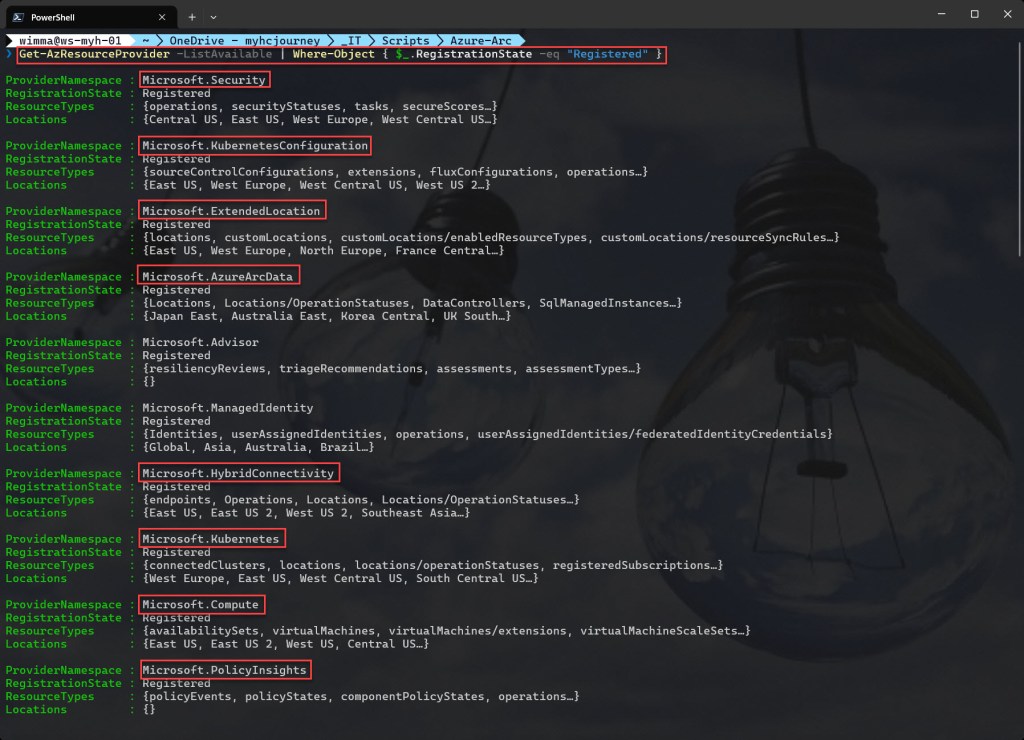
💡The required Azure Arc resource providers include Microsoft.HybridCompute, Microsoft.GuestConfiguration, Microsoft.HybridConnectivity, (for Azure Arc-enabled Servers) Microsoft.AzureArcData (for Azure Arc-enabled data services), Microsoft.Kubernetes, Microsoft.KubernetesConfiguration, Microsoft.ExtendedLocation (for Azure Arc-enabled Kubernetes), Microsoft.Compute (for Azure Update Manager and automatic extension upgrades), Microsoft.Security, and Microsoft.PolicyInsights (for Microsoft Defender for Cloud).
An easier and faster way is to use Azure PowerShell by running the following command:
Get-AzResourceProvider -ListAvailable | Where-Object { $_.RegistrationState -eq "Registered" }
Conclusion
I hope this Azure PowerShell script proves useful and gives you a solid starting point for integrating Azure Arc into your Azure and hybrid environment.
If you have any questions or suggestions, feel free to reach out to me via my X handle (@wmatthyssen) or leave a comment.
 Wim Matthyssen
Pingback: Azure Back to School 2022: Let’s take a look at Azure Arc-enabled VMware vSphere – Wim Matthyssen
Pingback: Azure Back to School 2023: Let’s take a look at Azure Arc-enabled System Center Virtual Machine Manager – Wim Matthyssen
Hi Wim, nice article! I worked with your Remove-ESU-license-using-Azure-Arc-WS2012-ESU-ARM-APIs powershell script to delete some “test” license files. Pretty cool!
I’m searching for a script to connect ARC enabled servers with a dedicated license file by script. We have more then 100 to connect… Do you have an idea or link to the API documentation?
LikeLike
Ok, I found it by my own: https://learn.microsoft.com/en-us/azure/azure-arc/servers/api-extended-security-updates
This it’s hard to start for me 😦
LikeLike