If you’ve recently enabled Azure Firewall’s “Auto-learn IP prefixes” preview feature and suddenly can’t RDP into your Azure VMs over a Point-to-Site (P2S) VPN, you’re not alone. In this blog post, I’ll walk you through what’s happening and show you how to fix it.
The Conflict: Why “Auto-learn” Breaks RDP
The “Auto-learn IP Prefixes” (preview) feature is designed to simplify SNAT (Source Network Address Translation). It automatically identifies which IP ranges are considered internal, so the firewall knows when to skip SNAT for traffic destined for those ranges.
For this to work, the firewall needs a way to dynamically discover these ranges. This is where Azure Route Server comes in.
💡 It is important to note that Route Server integration is currently only supported on VNet Firewalls. If you are using a Secured Virtual Hub (Azure Virtual WAN), this specific integration is not available.
The “Auto-learn” feature does not rely on direct BGP peering from the firewall itself. Instead, it uses prefixes learned via Azure Route Server, which are then reflected in the firewall’s effective routing context.
The problem arises when the firewall cannot learn the P2S client address pool, either because Route Server is not enabled or because the pool is not propagated to the routing table. Without that visibility, the firewall does not recognize your VPN client’s IP as internal and defaults to applying SNAT to traffic returning from the VM.
In this scenario, the firewall treats the VPN client as a “public” entity, triggering the asymmetric routing loop that ultimately breaks the RDP handshake.
This creates two compounding issues:
The firewall replaces the VM’s source IP with one of its own..
The VPN client receives a reply from the firewall’s IP instead of the VM.
Because the source IP does not match what the VPN client expects, the packet is dropped and the RDP session breaks.
Reproducing the Issue
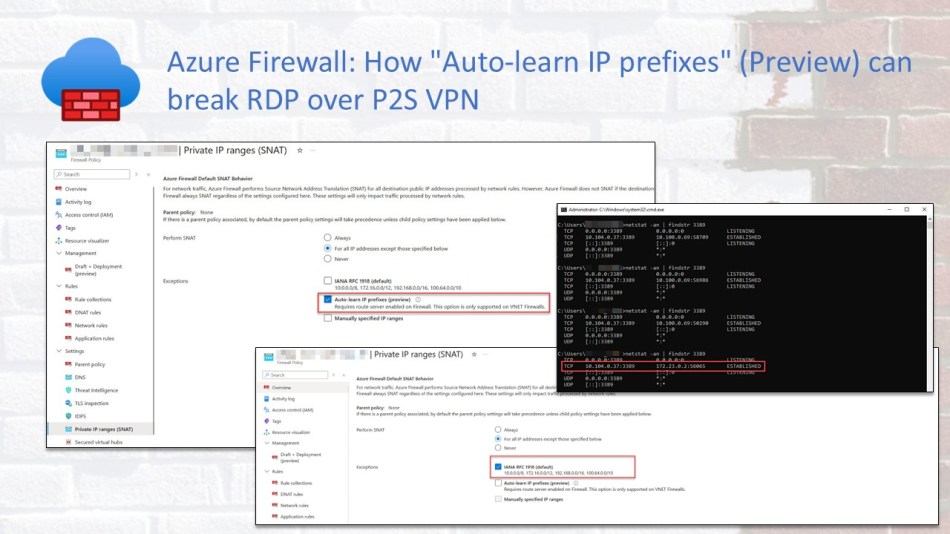
In this environment, Route Server was not enabled, which prevented the firewall from learning the P2S VPN routes. This leads to a subtle but critical connectivity problem, as illustrated in the screenshots below.
The Symptom: In the first screenshot, we see the response arriving at the VPN client with a NAT-ed source IP (a firewall’s IP) instead of the VM’s. This mismatch causes the client to drop the packet.
The Reality: The second screenshot shows the actual VM IP that the VPN client should have received to maintain a proper RDP session.
Comparing the two clearly demonstrates how SNAT is inadvertently breaking traffic.
The Fix
The solution in this case was to move away from the dynamic “Auto-learn” preview setting and revert to the standard Azure Firewall behavior. By explicitly selecting the IANA RFC 1918 (default) ranges, you ensure the firewall treats all common private IP blocks as internal, regardless of whether it “learned” them via BGP.
Reverting to the Default SNAT Behavior
If you are experiencing these RDP drops and cannot use (or don’t want to deploy) Route Server, change the selection from “Auto-learn IP Prefixes (preview) to IANA RFC 1918 (default).
Why This Works
By selecting IANA RFC 1918, you are telling the firewall to skip SNAT for any traffic destined for the standard private ranges:
10.0.0.0/8
172.16.0.0/12
192.168.0.0/16
Since most P2S VPN pools fall within these ranges*, which was also the case in this environment, the firewall will immediately recognize your VPN client as internal. It will stop applying SNAT and the source IP mismatch will disappear, allowing your RDP session to connect successfully.
*This solution assumes that your P2S client address pool falls within one of the standard private IP ranges. If you are using a custom or non-RFC 1918 address range, such as repurposed public IP space, enabling the IANA RFC 1918 option alone will not resolve the issue.
Conclusion
The “Auto-learn IP Prefixes” feature is a powerful setting for simplifying network management, but as this case shows, preview features can introduce unexpected behavior in specific architectures. If your Azure Firewall lacks visibility into your VPN routes, the resulting asymmetric routing will quickly break stateful protocols like RDP.
For most environments using standard private address pools, sticking with the IANA RFC 1918 (default) setting remains the most reliable way to ensure consistent connectivity. If you do choose to use “Auto-learn,” always verify your SNAT logs and routing tables, and test your RDP connections, to ensure your P2S clients are not being inadvertently treated as external traffic.
Hopefully, this saves you a few hours of troubleshooting. If you have any questions or have encountered a similar routing quirk with Azure Firewall, feel free to reach out to me on X (@wmatthyssen) or leave a comment below. I’ll be happy to help.


 Wim Matthyssen
If you’ve recently enabled Azure Firewall’s “Auto-learn IP prefixes” preview feature and suddenly can’t RDP into your Azure VMs over a Point-to-Site (P2S) VPN, you’re not alone. In this blog post, I’ll walk you through what’s happening and show you how to fix it.
The Conflict: Why “Auto-learn” Breaks RDP
The “Auto-learn IP Prefixes” (preview) feature is designed to simplify SNAT (Source Network Address Translation). It automatically identifies which IP ranges are considered internal, so the firewall knows when to skip SNAT for traffic destined for those ranges.
For this to work, the firewall needs a way to dynamically discover these ranges. This is where Azure Route Server comes in.
💡 It is important to note that Route Server integration is currently only supported on VNet Firewalls. If you are using a Secured Virtual Hub (Azure Virtual WAN), this specific integration is not available.
The “Auto-learn” feature does not rely on direct BGP peering from the firewall itself. Instead, it uses prefixes learned via Azure Route Server, which are then reflected in the firewall’s effective routing context.
The problem arises when the firewall cannot learn the P2S client address pool, either because Route Server is not enabled or because the pool is not propagated to the routing table. Without that visibility, the firewall does not recognize your VPN client’s IP as internal and defaults to applying SNAT to traffic returning from the VM.
In this scenario, the firewall treats the VPN client as a “public” entity, triggering the asymmetric routing loop that ultimately breaks the RDP handshake.
This creates two compounding issues:
Because the source IP does not match what the VPN client expects, the packet is dropped and the RDP session breaks.
Reproducing the Issue
In this environment, Route Server was not enabled, which prevented the firewall from learning the P2S VPN routes. This leads to a subtle but critical connectivity problem, as illustrated in the screenshots below.
Comparing the two clearly demonstrates how SNAT is inadvertently breaking traffic.
The Fix
The solution in this case was to move away from the dynamic “Auto-learn” preview setting and revert to the standard Azure Firewall behavior. By explicitly selecting the IANA RFC 1918 (default) ranges, you ensure the firewall treats all common private IP blocks as internal, regardless of whether it “learned” them via BGP.
Reverting to the Default SNAT Behavior
If you are experiencing these RDP drops and cannot use (or don’t want to deploy) Route Server, change the selection from “Auto-learn IP Prefixes (preview) to IANA RFC 1918 (default).
Why This Works
By selecting IANA RFC 1918, you are telling the firewall to skip SNAT for any traffic destined for the standard private ranges:
Since most P2S VPN pools fall within these ranges*, which was also the case in this environment, the firewall will immediately recognize your VPN client as internal. It will stop applying SNAT and the source IP mismatch will disappear, allowing your RDP session to connect successfully.
*This solution assumes that your P2S client address pool falls within one of the standard private IP ranges. If you are using a custom or non-RFC 1918 address range, such as repurposed public IP space, enabling the IANA RFC 1918 option alone will not resolve the issue.
Conclusion
The “Auto-learn IP Prefixes” feature is a powerful setting for simplifying network management, but as this case shows, preview features can introduce unexpected behavior in specific architectures. If your Azure Firewall lacks visibility into your VPN routes, the resulting asymmetric routing will quickly break stateful protocols like RDP.
For most environments using standard private address pools, sticking with the IANA RFC 1918 (default) setting remains the most reliable way to ensure consistent connectivity. If you do choose to use “Auto-learn,” always verify your SNAT logs and routing tables, and test your RDP connections, to ensure your P2S clients are not being inadvertently treated as external traffic.
Hopefully, this saves you a few hours of troubleshooting. If you have any questions or have encountered a similar routing quirk with Azure Firewall, feel free to reach out to me on X (@wmatthyssen) or leave a comment below. I’ll be happy to help.
Share this: